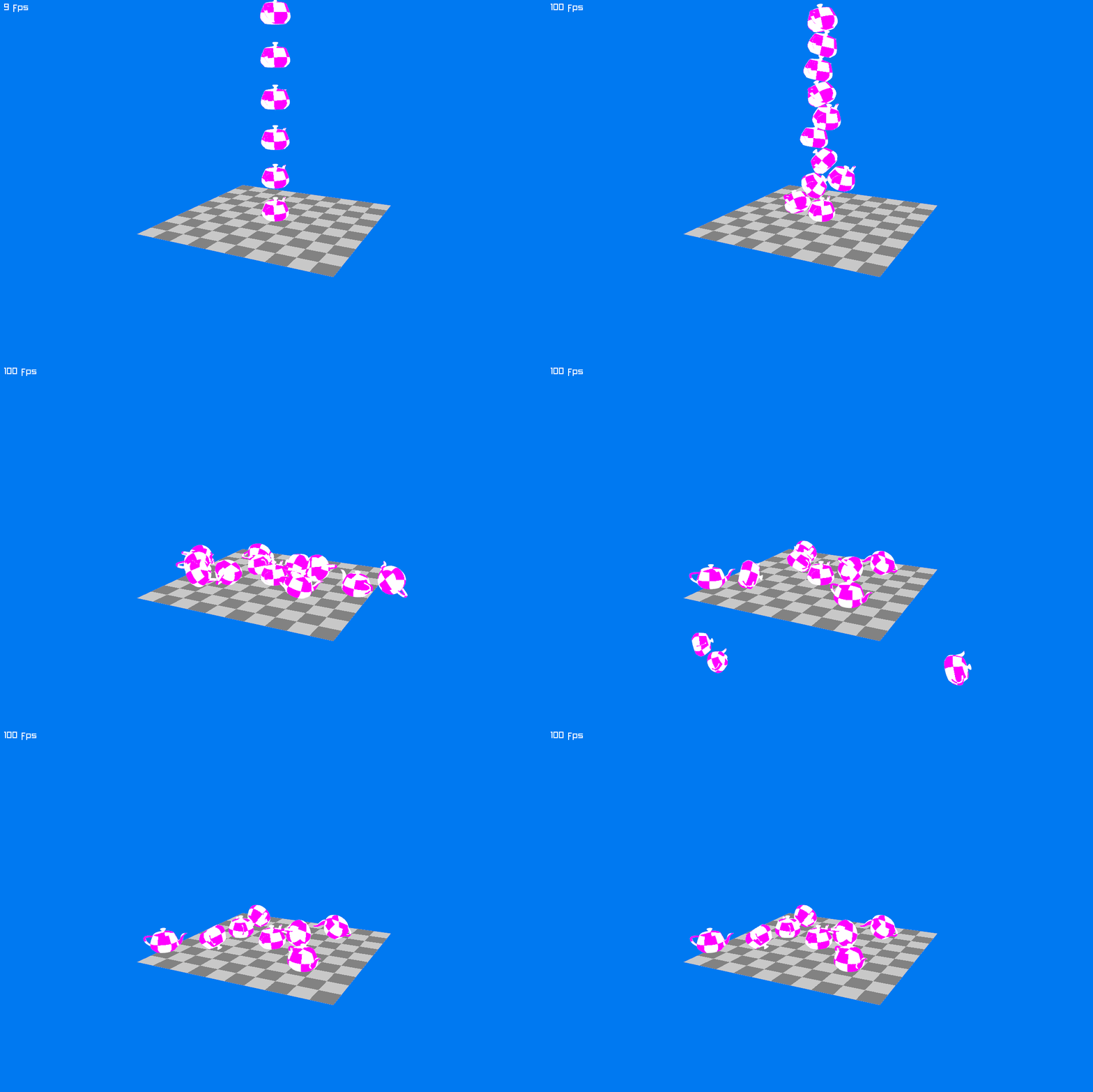
Hello World
Creating the PointCloudShape
We can now create a PointCloudShape from the sampled vertices:
// find a few points on the convex hull of the teapot.
var vertices = ShapeHelper.SampleHull(allVertices, subdivisions: 3);

// use these points to create a PointCloudShape.
var pointCloudShape = new PointCloudShape(vertices);
Jitter expects the body's center of mass at its local origin, (0, 0, 0). The teapot model is offset from that origin, so using it unchanged would make the body rotate around the wrong point.
Use PointCloudShape.Shift to move the shape's center of mass to the origin:
// find a few points on the convex hull of the teapot.
var vertices = ShapeHelper.SampleHull(allVertices, subdivisions: 3);

// use these points to create a PointCloudShape.
var pointCloudShape = new PointCloudShape(vertices);

// shift the shape so its center of mass is at the origin.
pointCloudShape.GetCenter(out JVector centerOfMass);
pointCloudShape.Shift = -centerOfMass;

// pointCloudShape.GetCenter(out centerOfMass); // now returns (0, 0, 0)

// finally, create the rigid body for the teapot
var rigidBody = world.CreateRigidBody();
rigidBody.AddShape(pointCloudShape);
Warning
Apply the same shift when drawing the model, so the visible teapot matches its collision shape. The complete example below does this.
Creating Multiple Instances of the Same Shape
Each body needs its own shape instance. Use PointCloudShape.Clone() to create another instance that shares the same vertex data:
var shapeInstance1 = new PointCloudShape(vertices);
var shapeInstance2 = shapeInstance1.Clone(); // Safe to use in a second body
This lets us reuse the sampled vertices for every teapot.
Putting it all together
Replace the contents of Program.cs with this complete example:
using System.Numerics;
using Raylib_cs;
using Jitter2;
using Jitter2.Collision.Shapes;
using Jitter2.Dynamics;
using Jitter2.LinearMath;
using static Raylib_cs.Raylib;

static Matrix4x4 GetRayLibTransformMatrix(RigidBody body)
{
    JMatrix ori = JMatrix.CreateFromQuaternion(body.Orientation);
    JVector pos = body.Position;

    return new Matrix4x4(ori.M11, ori.M12, ori.M13, pos.X,
                         ori.M21, ori.M22, ori.M23, pos.Y,
                         ori.M31, ori.M32, ori.M33, pos.Z,
                         0, 0, 0, 1.0f);
}

static Texture2D GenCheckedTexture(int size, int checks, Color colorA, Color colorB)
{
    Image imageMag = GenImageChecked(size, size, checks, checks, colorA, colorB);
    Texture2D textureMag = LoadTextureFromImage(imageMag);
    UnloadImage(imageMag);
    return textureMag;
}

const int numberOfTeapots = 12;

// set a hint for anti-aliasing
SetConfigFlags(ConfigFlags.Msaa4xHint);

// initialize a 1200x800 px window with a title
InitWindow(1200, 800, "TeaDrop example");

// dynamically create a plane model
Texture2D texture = GenCheckedTexture(10, 1,  Color.LightGray, Color.Gray);
Model planeModel = LoadModelFromMesh(GenMeshPlane(20, 20, 10, 10));
SetMaterialTexture(ref planeModel, 0, MaterialMapIndex.Diffuse, ref texture);

// load the teapot model from file
Model teapotModel = LoadModel("teapot.obj");

// load the mesh vertices
if (teapotModel.MeshCount == 0)
    throw new Exception("Model could not be loaded!");

Mesh teapotMesh;
unsafe { teapotMesh = teapotModel.Meshes[0]; }
var allVertices = teapotMesh.VerticesAs<JVector>();

// sample vertices on the convex hull
var vertices = ShapeHelper.SampleHull(allVertices, 4);

// create the PointCloudShape from the reduced vertices
var pointCloudShape = new PointCloudShape(vertices);

// shift the shape, such that the center of mass is at the origin
pointCloudShape.GetCenter(out JVector center);
pointCloudShape.Shift = -center;

// we need to take the transpose here, since Raylib and System.Numerics
// use a different convention
Matrix4x4 shift = Matrix4x4.CreateTranslation(-center);
shift = Matrix4x4.Transpose(shift);

texture = GenCheckedTexture(16, 2,  Color.White, Color.Magenta);
Material teapotMat = LoadMaterialDefault();
SetMaterialTexture(ref teapotMat, MaterialMapIndex.Diffuse, texture);

// initialize the Jitter physics world
World world = new ();
world.SubstepCount = 4;

// add a body representing the plane
RigidBody planeBody = world.CreateRigidBody();
planeBody.AddShape(new BoxShape(20));
planeBody.Position = new JVector(0, -10, 0);
planeBody.MotionType = MotionType.Static;

// add numberOfTeapots teapots
for(int i = 0; i < numberOfTeapots; i++)
{
    RigidBody body = world.CreateRigidBody();
    body.AddShape(pointCloudShape.Clone());
    body.Position = new JVector(0, i * 4 + 0.5f, 0);
}

// create a camera
Camera3D camera = new ()
{
    Position = new Vector3(-40.0f, 16.0f, 20.0f),
    Target = new Vector3(0.0f, 4.0f, 0.0f),
    Up = new Vector3(0.0f, 1.0f, 0.0f),
    FovY = 45.0f,
    Projection = CameraProjection.Perspective
};

// 100 fps target
SetTargetFPS(100);

// simple render loop
while (!WindowShouldClose())
{
    BeginDrawing();
    ClearBackground(Color.Blue);

    BeginMode3D(camera);

    DrawModel(planeModel, Vector3.Zero, 1.0f, Color.White);

    world.Step(1.0f / 100.0f, true);

    foreach(var body in world.RigidBodies)
    {
        if (body == planeBody || body == world.NullBody) continue; // do not draw this
        DrawMesh(teapotMesh, teapotMat, GetRayLibTransformMatrix(body) * shift);
    }

    EndMode3D();
    DrawText($"{GetFPS()} fps", 10, 10, 20, Color.White);

    EndDrawing();
}

CloseWindow();